
Power Transmission and Distribution
Monitor substations and feeders in a web browser. YTCC talks to RTUs and IEDs in the field over IEC 60870-5-104, IEC 60870-5-101 and DNP3, shows single-line diagrams with their energized and de-energized lines, sorts events by field time and logs every command.
Monitor your substations and keep every command on record
Operators of a transmission or distribution grid watch substations, feeders and remote field units spread over a wide area at the same time. Breaker and disconnector positions, busbar voltages and transformer loads have to stay current on screen, a lost link to a substation has to be noticed, and every command has to reach the right object, come from an authorized person and leave a trace.
You draw single-line diagrams in the screen editor with ready-made electrical objects: busbar and double busbar, circuit breaker and withdrawable breaker, disconnector, load-break switch, three-position and earthing switch, recloser, two- and three-winding transformer, autotransformer, current and voltage transformer, RMU, generator and load. Lines are colored by whether they are energized, in the editor and on the runtime screen. In the editor's electrical simulation you click a breaker or a disconnector to change its position and watch the colors and interlocks respond, without changing the project. From the topology, the server raises alarms for an energized and earthed line, a short circuit, a measurement that contradicts the topology and an unsupplied load.
YTCC talks to RTUs and IEDs in the field as master over IEC 60870-5-104, IEC 60870-5-101 over TCP and DNP3, and reads data from IEC 61850 (MMS) devices by polling. The IEC 104 driver runs a general interrogation when it connects and stores the device's CP56Time2a time tag as the time of the event. The event list, the alarm history and the historian are sorted by this field time, with the arrival time at the server in its own column. The intermediate and faulty positions of a double-point breaker are shown on screen as states of their own. In DNP3, class 1, 2 and 3 events are collected on separate periods, and unsolicited responses can be turned on. From an IEC 61850 SCL file, the single-line structure of the substation is read and turned into a diagram.
For control, the IEC 104 driver sends single commands with select-before-operate, which can be enabled per point; the execute command waits for a positive confirmation. A command is refused while communication is down, the result can be read back for verification, and a failed command raises an alarm. The sending user, signal, value, result and times go into the audit log, and refused commands are logged too. With responsibility zones, one user at a time controls a zone, and the server enforces that permission. When communication with a device is lost, one alarm is raised per device and its signals go to "no connection" quality.
A sample YTCC screen for Power Transmission and Distribution
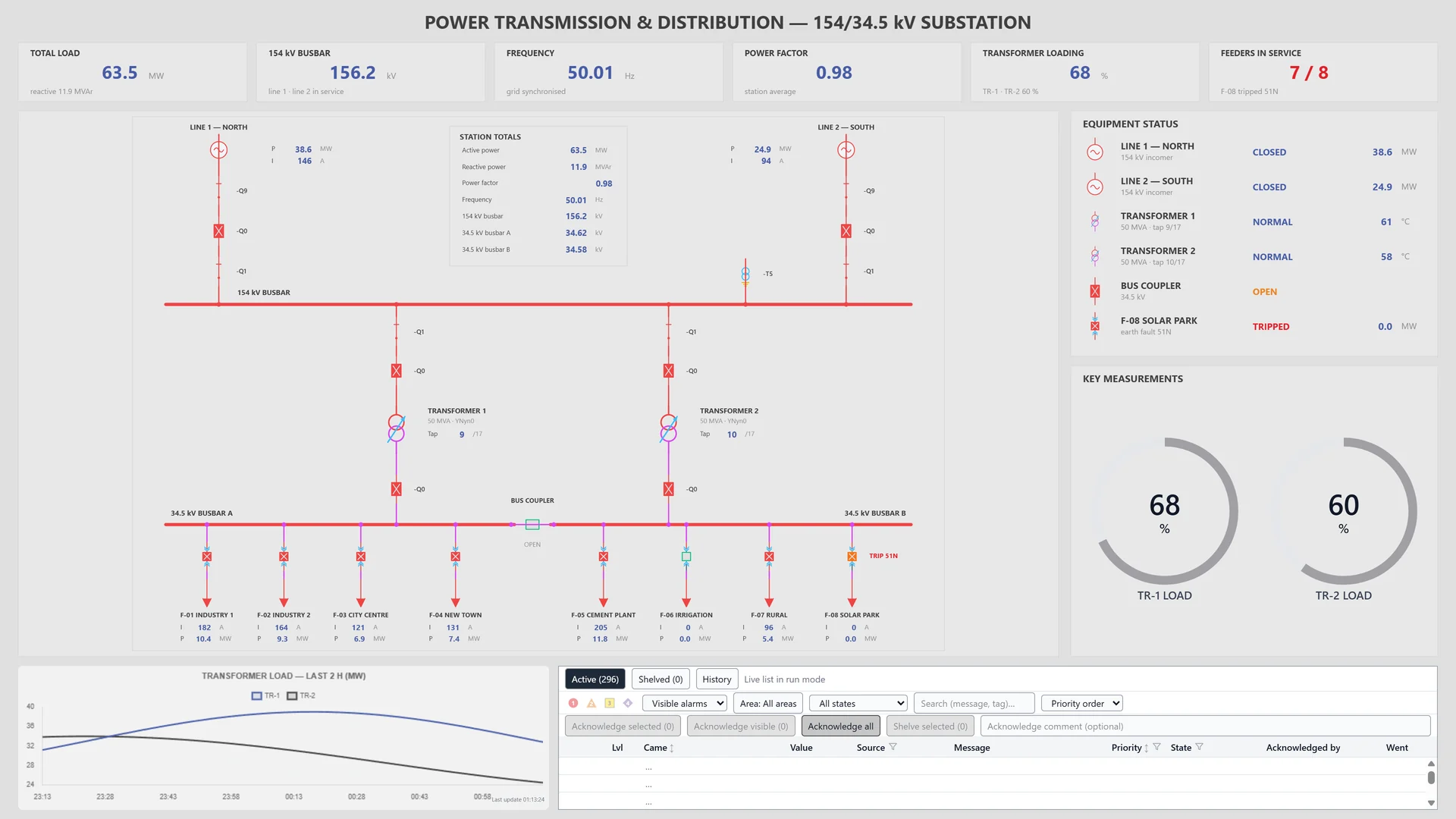
A sample screen made for a fictional 154/34.5 kV substation: single-line diagram, breaker and transformer states, a transformer load chart and the alarm list on one page.
Frequently asked questions
Which protocols does YTCC use to talk to transmission and distribution field devices?
As master: IEC 60870-5-104, IEC 60870-5-101 over TCP and DNP3. As client: IEC 61850 (MMS), reading by polling. The DNP3 driver runs over TCP, UDP and serial lines and can use TLS and Secure Authentication v5. Other field protocols, such as Modbus TCP and OPC UA, are listed on the Platform page.
Can two operators send commands to the same zone at the same time?
No. With responsibility zones, one user at a time controls a zone, and the server enforces control permission. A user takes, releases or requests control, and can force take it with the right permission.
Are events sorted by the time stamp from the field?
Yes. The IEC 104 driver stores the device's CP56Time2a time tag as the time of the event, and the event list, the alarm history and the historian are sorted by it. The arrival time at the server is shown in its own column. If the device time is missing or invalid, the arrival time is used.
YTCC. Your trusted control center for energy and industrial SCADA.
Download YTCC and build your first screen.