
Transportation Infrastructure
Monitor the ventilation, lighting, drainage and power infrastructure of tunnels in a web browser. YTCC collects data over Modbus TCP, OPC UA and SNMP, groups alarms and logs every command.


Monitor tunnel infrastructure from one screen
In a road tunnel, operators watch jet fans, lighting stages, drainage pumps, the power supply and air quality readings at the same time. Carbon monoxide and visibility values have to stay current on screen, and a fan fault or a lost link to a station has to be noticed.
YTCC talks to PLCs and remote I/O as Modbus TCP master and as OPC UA client and server. As an SNMP manager it polls the switches and devices on the tunnel network with v1, v2c and v3 (with authentication and privacy) and receives traps, and its MQTT client takes data from gateways. When communication with a device is lost, one alarm is raised per device, and a separate one if the driver process stops responding.
You draw the tunnel section and the equipment layout in the screen editor and bind fans, pumps and sensors to signals. Alarms are gathered by tube, zone or system in nested groups, and group counters show how many alarms are waiting in each zone; chattering alarms and alarm floods are detected.
A command is refused while communication is down, the result can be read back for verification, and a failed command raises an alarm. The sending user, signal, value, result and times go into the audit log, and you can download the alarm and command history as Excel or CSV.
A sample YTCC screen for Transportation Infrastructure
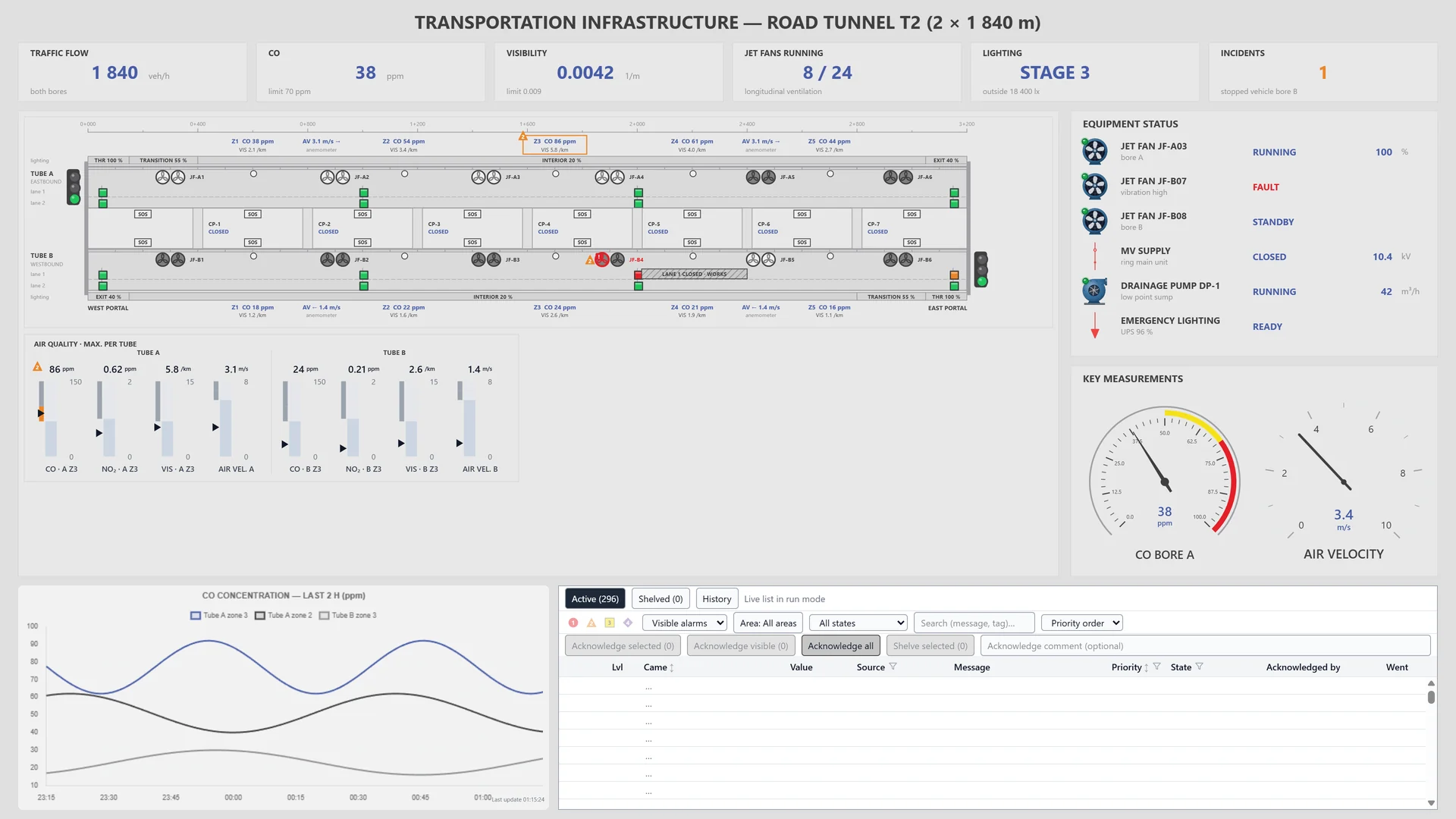
A sample screen made for a fictional road tunnel: twin-tube layout, jet fans, air quality readings, equipment states and the alarm list on one page.
Frequently asked questions
Which protocols does YTCC use with tunnel equipment?
As master: Modbus TCP. As client: OPC UA and MQTT, and as an OPC UA server too. It monitors network devices as an SNMP manager and receives traps. Other field protocols are listed on the Platform page.
Can I separate alarms by tunnel zone?
Yes. With rule-based, nested alarm groups you gather alarms by tube, zone or system. Group counters show the alarms in each group, and you acknowledge a group at once.
Can I export the alarm and command history?
Yes. You download the alarm and command history as Excel or CSV. Commands include the sending user, the value and the result.
YTCC. Your trusted control center for energy and industrial SCADA.
Download YTCC and build your first screen.